US English (US)
FR French
DE German
ES Spanish
IT Italian
NL Dutch
JP Japanese

Contact Us

If you still have questions or prefer to get help directly from an agent, please submit a request.
We’ll get back to you as soon as possible.

  • Contact Us
English (US)
US English (US)
FR French
DE German
ES Spanish
IT Italian
NL Dutch
JP Japanese
  • Home
  • Password Boss Knowledgebase
  • Password Boss Partner Documents
  • RUNBOOKS - CUSTOMERS

User - Lost Master Password

Written by Owen Parry

Updated at July 16th, 2025

Contact Us

If you still have questions or prefer to get help directly from an agent, please submit a request.
We’ll get back to you as soon as possible.

  • AutoElevate Knowledgebase
    New to AutoElevate? START HERE General & Troubleshooting Managing Rules Integrations Announcements FAQ Sales & Marketing
  • Password Boss Knowledgebase
    Using Password Boss Business Administration Password Boss Partner Documents
  • CyberFOX DNS Filtering
    Getting Started Filtering Policies Company and Location Setup Roaming Clients Reporting and Logging Troubleshooting
  • Marketing Toolkit
    MSP Marketing & Education Toolkit
  • Changelogs for Autoelevate and Password Boss
  • CyberFOX Product Roadmap
  • Current Status
+ More

Table of Contents

Resetting the Master Password in the Partner Portal

Password Boss does not store a copy of your Master Password, nor do we have the ability to reset it. A forgotten Master Password typically means that your account has to be reset, and you need to start over. Users on our WebApp version of Password Boss can change their Master Password without losing any data if they keep the Account Recovery PDF. Without the recovery Key, all data will be lost. 

Any data stored in Password Boss may be permanently deleted if your company has not enabled the backup of all business profile items from each user's account. For users who lose or forget their Master Password, you must reset their master password from the Partner Portal to generate a new temporary master password. It is impossible to resend the original temporary password email when it was created since we do not store the temporary passwords.


Resetting the Master Password in the Partner Portal


  1. Log in to the Partner Portal.
     
  2. Locate the user account.
     
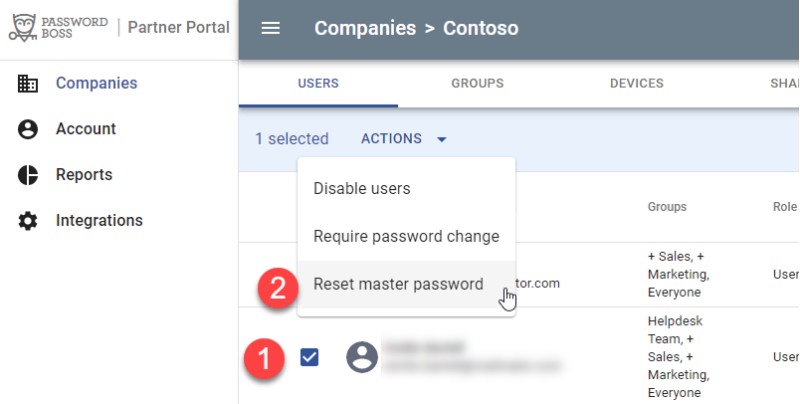
  3. Click the checkbox next to the user name.
     
  4. From the blue Actions menu, choose Reset master password. (see pic below)

     
  5. Please type Yes in the confirmation dialogue to indicate that you understand that all data for this user account will be deleted.
     
  6. A new temporary password for desktop users or instructions for webapp users will be emailed to the user.
login issue forgot password

Was this article helpful?

Yes
No
Give feedback about this article

Related Articles

  • Transferring primary user account ⭐
  • Adding customers
  • New customer deployment checklist
  • Changing user license counts
Request a Demo
  • Get Pricing
  • Start Trial
  • Contact
  • Support Center
  • Login
Solutions
AutoElevate
  • AutoElevate Overview
  • Remove Admin Privilege
  • Just-in-Time Admin
  • Blocker
Password Manager
  • Password Manager Overview
  • Features
DNS Filtering
  • DNS Filtering Overview
MSPs
IT Departments
  • Overview
  • State and Local Government
  • K-12 Education
  • Manufacturing
  • Higher Education
Resources
  • Resource Center
  • Group Demos
  • Events
  • The Simple 7™
Company
  • About
  • Leadership
  • Culture & Values
  • News & Press
  • Awards
  • Partnerships
  • Referral Program
  • Trust Center
CyberFox Logo

CALL US (813) 578-8200

© 2025 CYBERFOX LLC ALL RIGHTS RESERVED | Privacy Policy | Terms of Service | Sitemap


Knowledge Base Software powered by Helpjuice

Expand