US English (US)
FR French
DE German
ES Spanish
IT Italian
NL Dutch
JP Japanese

Contact Us

If you still have questions or prefer to get help directly from an agent, please submit a request.
We’ll get back to you as soon as possible.

  • Contact Us
English (US)
US English (US)
FR French
DE German
ES Spanish
IT Italian
NL Dutch
JP Japanese
  • Home
  • Password Boss Knowledgebase
  • Using Password Boss
  • Password Boss in Your Browser

Alternate 2FA fill functions.

Gain insight into the time-saving right-click function of Password Boss for quickly and easily managing passwords.

Written by Chris Liles

Updated at July 28th, 2025

Contact Us

If you still have questions or prefer to get help directly from an agent, please submit a request.
We’ll get back to you as soon as possible.

  • AutoElevate Knowledgebase
    New to AutoElevate? START HERE General & Troubleshooting Managing Rules Integrations Announcements FAQ Sales & Marketing
  • Password Boss Knowledgebase
    Using Password Boss Business Administration Password Boss Partner Documents
  • CyberFOX DNS Filtering
    Getting Started Filtering Policies Company and Location Setup Roaming Clients Reporting and Logging Troubleshooting
  • Marketing Toolkit
    MSP Marketing & Education Toolkit
  • Changelogs for Autoelevate and Password Boss
  • CyberFOX Product Roadmap
  • Current Status
+ More

In some cases, the 2FA (two-factor authentication) code stored in Password Boss may not automatically populate into the website's 2FA field. This typically occurs when websites use non-standard naming conventions in their field code, which can prevent the auto-fill feature from detecting the correct input field.

If auto-fill does not work, you can still access and use your 2FA code through the following methods:

  • The 2FA code is populated into the paste buffer as that item is used; you can right-click (or ctrl-v) and paste it into the 2FA code field. 
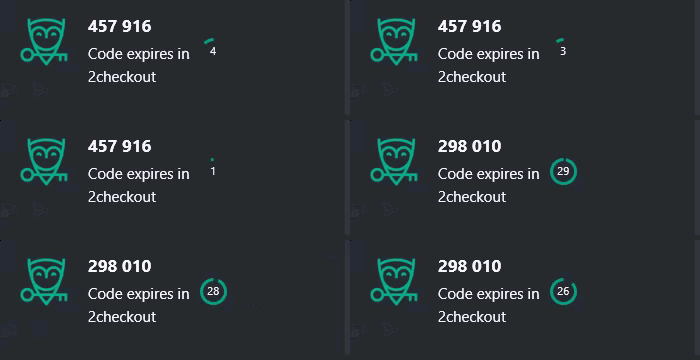
  • At the same time, a pop-up notification shows up just above the clock in the lower right in Windows, showing the code and how long it remains to use. This box will also show the following code if you run out of time. You can type that code into the 2FA field.
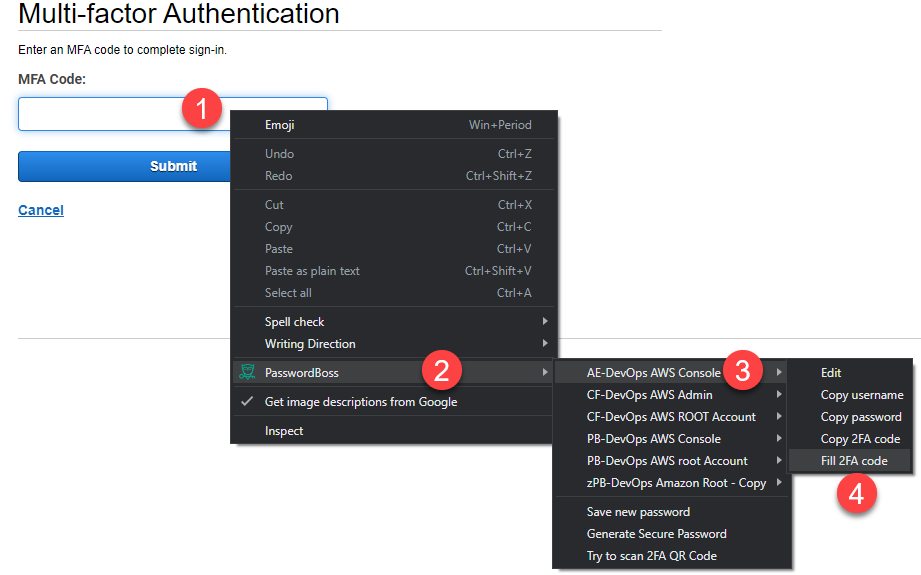
  • You can also right-click in the 2FA field and locate the Password Boss context menu to fill in the most recent 2FA code. Here is an example of the Password Boss Content Menu filling in items:
 
 
right-click password boss

Was this article helpful?

Yes
No
Give feedback about this article

Related Articles

  • Troubleshooting Password Boss in your browser
  • Enabling the Password Boss Safari extension in iOS
  • Uninstalling the browser buttons
  • Logging into websites ⭐
Request a Demo
  • Get Pricing
  • Start Trial
  • Contact
  • Support Center
  • Login
Solutions
AutoElevate
  • AutoElevate Overview
  • Remove Admin Privilege
  • Just-in-Time Admin
  • Blocker
Password Manager
  • Password Manager Overview
  • Features
DNS Filtering
  • DNS Filtering Overview
MSPs
IT Departments
  • Overview
  • State and Local Government
  • K-12 Education
  • Manufacturing
  • Higher Education
Resources
  • Resource Center
  • Group Demos
  • Events
  • The Simple 7™
Company
  • About
  • Leadership
  • Culture & Values
  • News & Press
  • Awards
  • Partnerships
  • Referral Program
  • Trust Center
CyberFox Logo

CALL US (813) 578-8200

© 2025 CYBERFOX LLC ALL RIGHTS RESERVED | Privacy Policy | Terms of Service | Sitemap


Knowledge Base Software powered by Helpjuice

Expand