NL Dutch
FR French
IT Italian
JP Japanese
DE German
US English (US)
ES Spanish

Contact Us

If you still have questions or prefer to get help directly from an agent, please submit a request.
We’ll get back to you as soon as possible.

  • Contact Us
English (US)
NL Dutch
FR French
IT Italian
JP Japanese
DE German
US English (US)
ES Spanish
  • Home
  • CyberFOX Password Manager Knowledgebase
  • Administrating CyberFOX Password Manager
  • CyberFOX Password Manager Entra and AD Integrations

Sync Rules

Use sync rules to determine how AD changes are reflected in the portal

Written by Owen Parry

Updated at September 12th, 2026

Contact Us

If you still have questions or prefer to get help directly from an agent, please submit a request.
We’ll get back to you as soon as possible.

  • AutoElevate Knowledgebase
    New to AutoElevate? START HERE AutoElevate Features & Troubleshooting Managing Rules in AutoElevate Integrations for AutoElevate AutoElevate FAQ Selling AutoElevate
  • CyberFOX Password Manager Knowledgebase
    Using CyberFOX Password Manager Administrating CyberFOX Password Manager Legacy Password Boss
  • CyberFOX DNS Filtering
    Getting Started with DNS Filtering DNS Filtering Concepts Network Requirements for DNS Filtering DNS Filtering Company and Location Setup Managing your DNS Filtering Policies Using Roaming Clients for DNS Filtering DNS Filtering Reports & Logs DNS Filtering Troubleshooting
  • Marketing Toolkit
    MSP Marketing & Education Toolkit CyberFOX Brand Guidelines
  • Changelogs for Autoelevate and Password Boss
  • CyberFOX Product Roadmap
  • Current Status
+ More

Table of Contents

Sync Rules When a new user account is synced from Active Directory to Password Boss When a user account is deleted from the Active Directory When a user account is disabled in the Active Directory When an Active Directory account is removed from syncing to Password Boss

Sync Rules


Sync Rules determine how changes made in AD are reflected in CyberFOX Password Manager. The Sync rules are configured in the CyberFOX Password Manager Portal by editing your Active Directory Connector.

The same sync rules are available for the Active Directory Connector and the Azure Active Directory Connector.
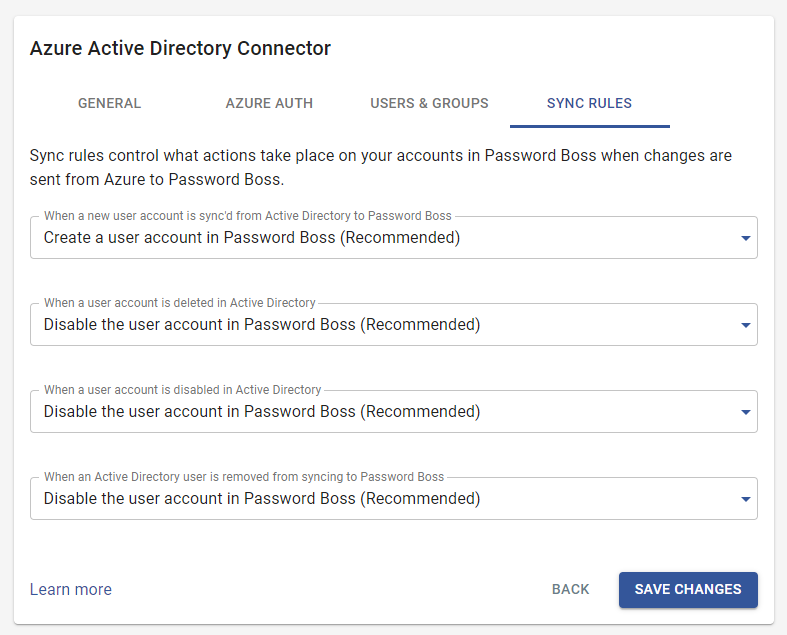


When a new user account is synced from Active Directory to CyberFOX Password Manager


  • Create a user account in CyberFOX Password Manager. This is the recommended setting and will work best for most businesses.
     
  • Create a pending user account in CyberFOX Password Manager that an admin must approve. When this setting is chosen, the new accounts will remain pending until an admin manually approves the accounts in the CyberFOX Password Manager Portal.
     

When a user account is deleted from the Active Directory


  • Disable the user account in CyberFOX Password Manager. This is the recommended setting and will work for most businesses. Note: Accounts cannot be automatically deleted from CyberFOX Password Manager via the Active Directory Connector. This is a safety mechanism to avoid accidentally deleting CyberFOX Password Manager accounts if an AD error occurs.
     
  • Remove the user from your account and convert the user to a personal account. This setting will generally only be useful for businesses where users use their personal email addresses for their CyberFOX Password Manager accounts.
     

When a user account is disabled in the Active Directory


  • Disable the user account in CyberFOX Password Manager. This is the recommended setting and will work for most businesses.
     
  • This setting will generally only be useful for businesses where users use their personal email addresses for their CyberFOX Password Manager accounts.
     

When an Active Directory account is removed from syncing to CyberFOX Password Manager


  • Disable the user account in CyberFOX Password Manager. This is the recommended setting and will work for most businesses.
     
  • Remove the user from your account and convert the user to a personal account. This setting will generally only be useful for businesses where users use their personal email addresses for their CyberFOX Password Manager accounts.
     
regulations synchronize

Was this article helpful?

Yes
No
Give feedback about this article

Related Articles

  • Active Directory Connector
  • Connect Entra ID to CyberFOX Password Manager
  • Synchronizing Groups
CyberFOX

PRACTICAL CYBERSECURITY FOR LEAN IT TEAMS

Platforms
  • Privileged Access Management
  • Password Management
  • DNS Filtering
  • SASE
Industry
  • Higher Education
  • K-12 Education
  • State and Local Government
  • Manufacturing
Company
  • About
  • Awards
  • Partnerships
  • Trust & Legal
  • Contact
  • Login
  • FAQ
  • Referral Program
  • Support
© 2026 CYBERFOX LLC ALL RIGHTS RESERVED | Privacy Policy | Terms of Service | Sitemap
Expand