NL Dutch
FR French
IT Italian
JP Japanese
DE German
US English (US)
ES Spanish

Contact Us

If you still have questions or prefer to get help directly from an agent, please submit a request.
We’ll get back to you as soon as possible.

  • Contact Us
English (US)
NL Dutch
FR French
IT Italian
JP Japanese
DE German
US English (US)
ES Spanish
  • Home
  • CyberFOX Password Manager Knowledgebase
  • Administrating CyberFOX Password Manager
  • CyberFOX Password Manager Admin Quick Reference
  • Whitelisting, Exclusions and Firewall Configurations

Sentinel One Exclusions for Password Boss

Learn how to configure Sentinel One antivirus so that it does not interfere with Password Boss.

Written by Owen Parry

Updated at July 14th, 2025

Contact Us

If you still have questions or prefer to get help directly from an agent, please submit a request.
We’ll get back to you as soon as possible.

  • AutoElevate Knowledgebase
    New to AutoElevate? START HERE AutoElevate Features & Troubleshooting Managing Rules in AutoElevate Integrations for AutoElevate AutoElevate FAQ Selling AutoElevate
  • CyberFOX Password Manager Knowledgebase
    Using CyberFOX Password Manager Administrating CyberFOX Password Manager Legacy Password Boss
  • CyberFOX DNS Filtering
    Getting Started with DNS Filtering DNS Filtering Concepts Network Requirements for DNS Filtering DNS Filtering Company and Location Setup Managing your DNS Filtering Policies Using Roaming Clients for DNS Filtering DNS Filtering Reports & Logs DNS Filtering Troubleshooting
  • Marketing Toolkit
    MSP Marketing & Education Toolkit CyberFOX Brand Guidelines
  • Changelogs for Autoelevate and Password Boss
  • CyberFOX Product Roadmap
  • Current Status
+ More

Table of Contents

Application Exclusions with Sentinel One

Application Exclusions with Sentinel One


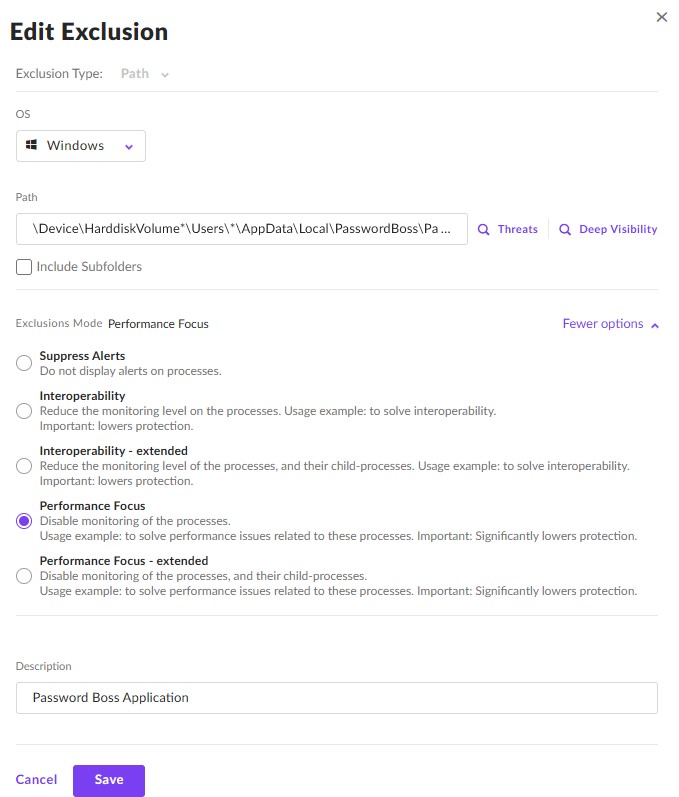
Path Exclusion is a feature in SentinelOne that allows an administrator to suppress false-positive events originating from specific files and processes. It also enables an administrator to exclude a path or file from monitoring where there are any interoperability issues. The exclusion also applies to processes whose route process is in the excluded path or file, meaning that if a process creates other child processes, the exclusion will apply to them, too. This benefits Password Boss users by preventing them from monitoring the application and its processes, ensuring its normal functioning.

Here are the steps to add a Path exclusion for Password Boss

  • From the suppressions menu, click New Exclusion
  • Select Path as the exclusion type
  • Select Windows as the OS
  • In the path line, enter: \Device\HarddiskVolume*\Users*\AppData\Local\PasswordBoss\PasswordBoss.exe
  • In the Exclusions Mode section, select Performance Focus
  • Give it a description such as Password Boss Application
  • Click Save

password boss sentinel exclusion

Was this article helpful?

Yes
No
Give feedback about this article

Related Articles

  • Firewall Whitelisting (CyberFOX Password Manager)
  • Application Whitelisting or Exclusions
  • Threat Locker Exclusions Settings for CyberFOX Password Manager
CyberFOX

PRACTICAL CYBERSECURITY FOR LEAN IT TEAMS

Platforms
  • Privileged Access Management
  • Password Management
  • DNS Filtering
  • SASE
Industry
  • Higher Education
  • K-12 Education
  • State and Local Government
  • Manufacturing
Company
  • About
  • Awards
  • Partnerships
  • Trust & Legal
  • Contact
  • Login
  • FAQ
  • Referral Program
  • Support
© 2026 CYBERFOX LLC ALL RIGHTS RESERVED | Privacy Policy | Terms of Service | Sitemap
Expand