US English (US)
FR French
DE German
ES Spanish
IT Italian
NL Dutch
JP Japanese

Contact Us

If you still have questions or prefer to get help directly from an agent, please submit a request.
We’ll get back to you as soon as possible.

  • Contact Us
English (US)
US English (US)
FR French
DE German
ES Spanish
IT Italian
NL Dutch
JP Japanese
  • Home
  • Password Boss Knowledgebase
  • Business Administration
  • Active Directory Connector

Creating a service account to run the Active Directory Connector

Learn how to set up a service account for running the Active Directory Connector efficiently.

Written by Owen Parry

Updated at June 19th, 2025

Contact Us

If you still have questions or prefer to get help directly from an agent, please submit a request.
We’ll get back to you as soon as possible.

  • AutoElevate Knowledgebase
    New to AutoElevate? START HERE General & Troubleshooting Managing Rules Integrations Announcements FAQ Sales & Marketing
  • Password Boss Knowledgebase
    Using Password Boss Business Administration Password Boss Partner Documents
  • CyberFOX DNS Filtering
    Getting Started Filtering Policies Company and Location Setup Roaming Clients Reporting and Logging Troubleshooting
  • Marketing Toolkit
    MSP Marketing & Education Toolkit
  • Changelogs for Autoelevate and Password Boss
  • CyberFOX Product Roadmap
  • Current Status
+ More

Table of Contents

Creating a service account that is a domain admin - used on a domain controller Creating a service account that is an administrator on the member server

The service account that will run the Active Directory Connector will need admin privileges on the server where the connector is installed.

  • If the Active Directory Connector is installed on a domain controller the service account must be a member of the Domain Admins group
  • If the Active directory Connector is installed on a member server the service account must be a member of the server's Administrators group.

Creating a service account that is a domain admin - used on a domain controller

  1. Open Active Directory Users and Computers.
  2. Create a new user.  Use a descriptive name like PasswordBossService.
  3. Create a strong password for the account and clear the checkbox so a password change is not required. You may also want to check the box for "Password never expires". 
    service-account.png
  4. Save the new password in Password Boss.
  5. Edit the service account in Active Directory User and Computers.
  6. On the Member Of tab, add the Domain Admins group and save the account.

Creating a service account that is an administrator on the member server

  1. Open Users and Groups.
  2. Create a new user.  Use a descriptive name like PasswordBossService.
  3. Create a strong password for the account and clear the checkbox so a password change is not required. You may also want to check the box for "Password never expires".
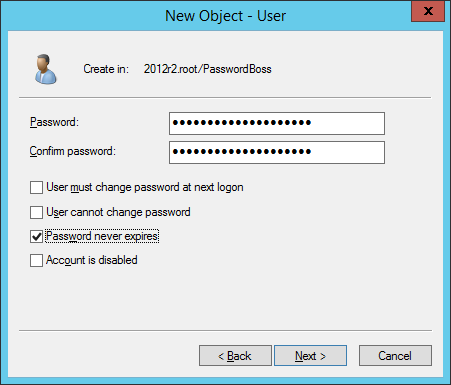
  4. Save the new password in Password Boss.
  5. Edit the user account and on the Member Of tab add the Administrators group and save the service account.
  6. Open Active Directory Users and Computers and right-click the domain and select Delegate Control.
  7. Add your service account to the User or Groups page.
  8. On the Tasks to Delegate page select Read all user information. delegation-wizard.png
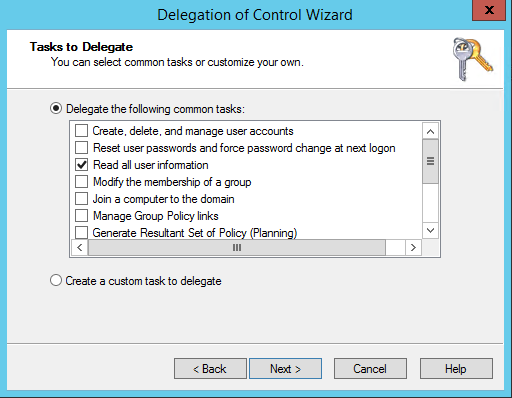
  9. Finish the wizard
  10. Install AD Lightweight Directory Service as a Role on your member server.
  11. Open Powershell or a command prompt and run the following commands
dsacls "CN=Deleted Objects,<Your_Base_DN_here>" /takeownership
dsacls "CN=Deleted Objects,<Your_Base_DN_here>" /G <Domain\PasswordBossService>:LCRP
ad connector service account

Was this article helpful?

Yes
No
Give feedback about this article

Related Articles

  • Active Directory Connector overview
  • Entra ID Connector for Password Boss
  • Active Directory Connector for Password Boss
Request a Demo
  • Get Pricing
  • Start Trial
  • Contact
  • Support Center
  • Login
Solutions
AutoElevate
  • AutoElevate Overview
  • Remove Admin Privilege
  • Just-in-Time Admin
  • Blocker
Password Manager
  • Password Manager Overview
  • Features
DNS Filtering
  • DNS Filtering Overview
MSPs
IT Departments
  • Overview
  • State and Local Government
  • K-12 Education
  • Manufacturing
  • Higher Education
Resources
  • Resource Center
  • Group Demos
  • Events
  • The Simple 7™
Company
  • About
  • Leadership
  • Culture & Values
  • News & Press
  • Awards
  • Partnerships
  • Referral Program
  • Trust Center
CyberFox Logo

CALL US (813) 578-8200

© 2025 CYBERFOX LLC ALL RIGHTS RESERVED | Privacy Policy | Terms of Service | Sitemap


Knowledge Base Software powered by Helpjuice

Expand