You are viewing an Archived item in your Knowledge Base, it is not publicly accessible.

NL Dutch
FR French
IT Italian
JP Japanese
DE German
US English (US)
ES Spanish

Contact Us

If you still have questions or prefer to get help directly from an agent, please submit a request.
We’ll get back to you as soon as possible.

  • Contact Us
English (US)
NL Dutch
FR French
IT Italian
JP Japanese
DE German
US English (US)
ES Spanish
  • Home
  • AutoElevate Knowledgebase

How to disable ConnectWise Access Management (CAM)

Learn the steps to quickly disable ConnectWise Access Management.

Written by Owen Parry

Updated at May 21st, 2026

Contact Us

If you still have questions or prefer to get help directly from an agent, please submit a request.
We’ll get back to you as soon as possible.

  • AutoElevate Knowledgebase
    New to AutoElevate? START HERE AutoElevate Features & Troubleshooting Managing Rules in AutoElevate Integrations for AutoElevate AutoElevate FAQ Selling AutoElevate
  • Password Boss Knowledgebase
    Using Password Boss Administrating Password Boss Legacy Password Boss
  • CyberFOX DNS Filtering
    Getting Started with DNS Filtering DNS Filtering Concepts Network Requirements for DNS Filtering DNS Filtering Company and Location Setup Managing your DNS Filtering Policies Using Roaming Clients for DNS Filtering DNS Filtering Reports & Logs DNS Filtering Troubleshooting
  • Marketing Toolkit
    MSP Marketing & Education Toolkit CyberFOX Brand Guidelines
  • Changelogs for Autoelevate and Password Boss
  • CyberFOX Product Roadmap
  • Current Status
+ More

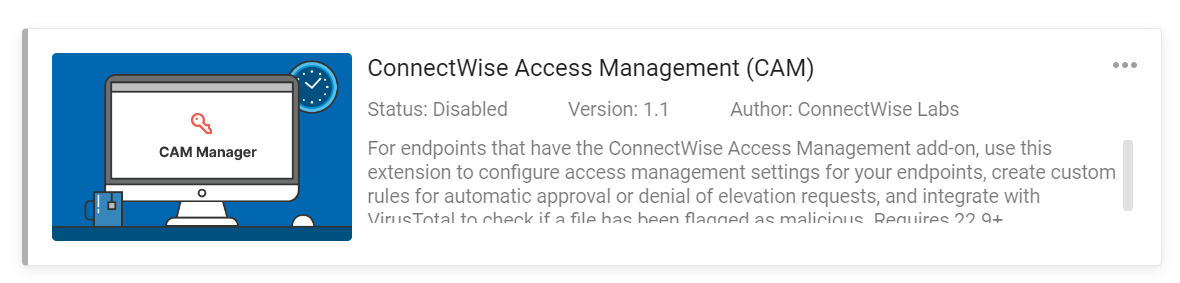
ConnectWise recently enabled an extension in control called “ConnectWise Access Management (CAM)”. This extension can interfere with your AutoElevate application. If you are experiencing issues due to the CAM extension, please verify that the extension is installed on your Control admin portal. 

  1. Log in to your Control admin portal
     
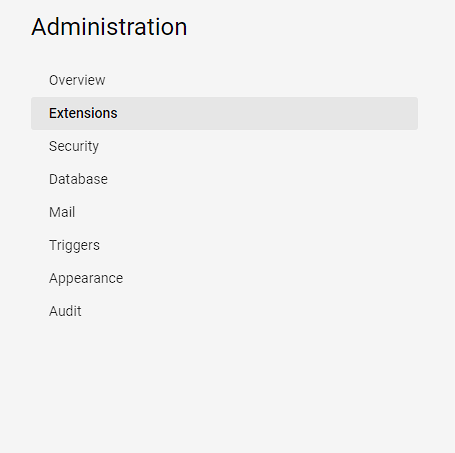
  2. Click on the admin button located on the left side of the window 

       mceclip0.png
     
  3.  Choose the extension menu item.

     mceclip1.png
     
  4. Look for ConnecWise Access Management (CAM) blobid0.png
     
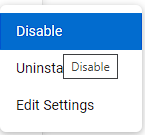
  5. Click on the ellipse and choose disable

            mceclip2.png


access control disable connectwise cam

Was this article helpful?

Yes
No
Give feedback about this article

Related Articles

  • Deploying using GPO
  • DNS Filtering with Shared IPs (Carrier Grade NAT / CGNAT)
Request a Demo
  • Get Pricing
  • Start Trial
  • Contact
  • Support Center
  • Login
Solutions
AutoElevate
  • AutoElevate Overview
  • Remove Admin Privilege
  • Just-in-Time Admin
  • Blocker
Password Manager
  • Password Manager Overview
  • Features
DNS Filtering
  • DNS Filtering Overview
MSPs
IT Departments
  • Overview
  • State and Local Government
  • K-12 Education
  • Manufacturing
  • Higher Education
Resources
  • Resource Center
  • Group Demos
  • Events
  • The Simple 7™
Company
  • About
  • Leadership
  • Culture & Values
  • News & Press
  • Awards
  • Partnerships
  • Referral Program
  • Trust Center
CyberFox Logo

CALL US (813) 578-8200

© 2025 CYBERFOX LLC ALL RIGHTS RESERVED | Privacy Policy | Terms of Service | Sitemap


Knowledge Base Software powered by Helpjuice

Expand